Virtual Card
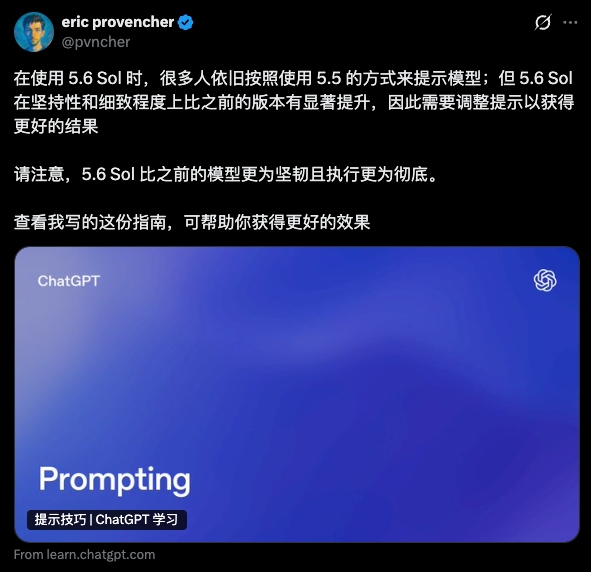
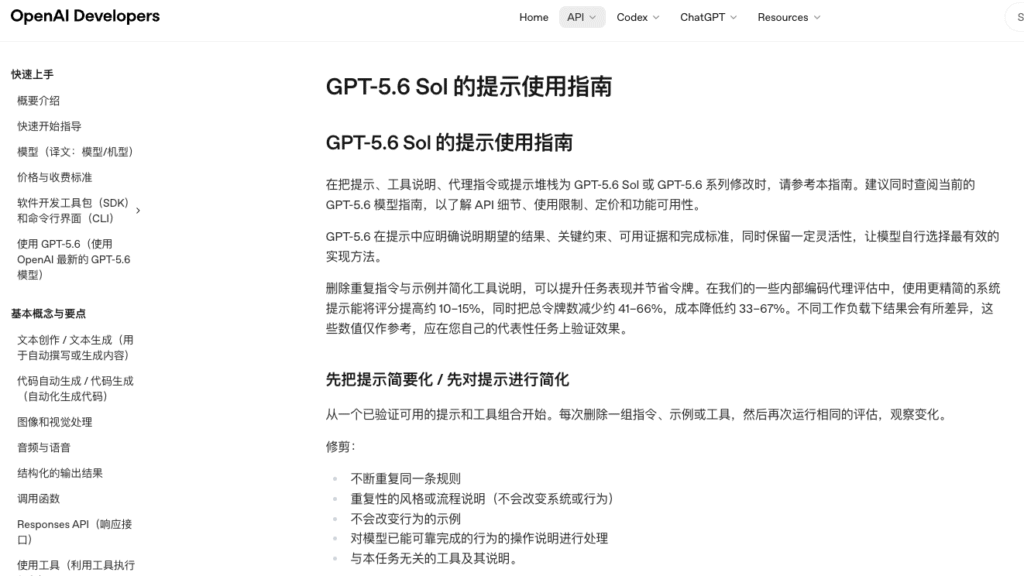
OpenAI recently released an official Prompt guide for GPT-5.6. The core point is clear: the model is getting stronger and stronger, and Prompt does not have to be longer and longer.
Many teams have similar experiences when developing Agent: If the model misses a step, just add one.MUST; If there is a problem with tool calling, please add one moreNEVER; The model has changed versions, but the old rules have been retained. As time goes by, the System Prompt pile becomes longer and longer. Not only does it contain duplicate content, but there may also be conflicting requirements.
As a result, Tokens cost more and the model becomes more difficult to perform.
According to OpenAI’s testing in internal Coding Agent tasks, a more streamlined System Prompt can increase the score by about 10% to 15%, while reducing the total Token consumption by 41% to 66%, and the cost is also reduced by about 33% to 67%.
This guide is not complicated. It boils down to four sentences: delete invalid content, clarify the final goal, draw action boundaries, and verify before completion.
The first step in Prompt: delete first, don’t rush to add
OpenAI recommends that when optimizing Prompt, do not add new rules at the beginning, but first look back: Which of the existing content is no longer necessary?
Many complex prompts are “patched” over a long period of time. Restrictions added when the capabilities of the old model are insufficient, examples left over from history, and recurring rules may not necessarily be valuable after the model is upgraded, but they still occupy the context window.
A safer approach is to start with a set of Prompt and tool configurations that work properly, and only delete one type of content at a time, such as repeated instructions, invalid examples, or irrelevant tool descriptions. After making the changes, use the same test task to verify the effect.
The advantage of doing this is that the team can clearly know: what has been deleted, whether it affects the results, and which content is really necessary.
What should be deleted is the information that no longer changes the behavior of the model; what should be left is the task objectives, success criteria, scope of authority, evidence requirements, and verification that must be completed before delivery.
Prompt is used for subtraction, not to reduce requirements, but to remove invalid noise. virtual card
Prescribe less steps and explain more clearly the results
When writing Prompt in the past, many people were used to specifying the process in very detail: what to search for first, which file to read next, what tool to call next, and what order to output in the end.
But for GPT-5.6, OpenAI recommends another way of writing: clearly telling the model what to ultimately accomplish, what is the basis for judgment, what cannot be done, and to what extent it is considered complete. As for how to proceed, let the model decide based on the actual situation.
This does not meanALWAYS、NEVER、MUSTcannot be written.
When it comes to security boundaries, required content, and prohibited operations, such rules still need to be written clearly. However, questions such as “Should you continue searching?” “When to call the tool?” and “Should you ask if there is insufficient information?” are more suitable for providing judgment criteria rather than hard-coding a set of processes.
For example, you can tell the model: when the evidence is sufficient, stop retrieval and deliver it; when key facts are missing, explain what is missing and give priority to filling it in a lower-cost way.
This can reduce repeated searches and prevent Tokens from being wasted in meaningless loops. virtual card
What can be done must be explained clearly in advance
After the Agent is connected to the tool, one more thing needs to be clarified in the Prompt: what exactly the model is authorized to do.
When the user asks the model to analyze, review, or make plans, it usually only means that the material can be read, problems checked, and conclusions drawn; only when the user requests modification, construction, or repair, the model can make local changes and non-destructive verification within the scope of the task.
As for external writing, deleting files, purchasing services, or operations that significantly expand the scope of the task, you should confirm again.
Just because the model knows “what it can do” next does not mean it has obtained the authorization “can execute it”.
The tools themselves should not be crammed into the model all at once. It is best to explain each tool clearly: what problem it solves, when to use it, what return results to focus on, and what to do if it fails.
The more tools and vaguer the descriptions, the greater the burden on the model in selecting tools.
The same goes for retrieval. For general questions, you can conduct a broader search first and answer directly after obtaining the core evidence; only if you find that key facts, dates, sources or references are missing, you can make targeted supplements.
If a certain piece of information is not found, it cannot be directly inferred that it does not exist; in the face of conflicting sources, the differences should be explained truthfully rather than forcing a firm conclusion.
Report progress on long tasks, don’t waste your reasoning
For longer tasks that require multiple calls to the tool, the guidance recommends updating progress only when key stages change.
There is no need to report to the user every time the tool is called. What is really worth synchronizing is starting execution, discovering important problems, completing key steps, or encountering situations that require user decisions.
Similarly, the Reasoning Effort is not as high as possible.
OpenAI’s recommendation is to first use the current settings as a baseline, and then test the same or lower inference gear. Only reviews prove ithighorxhighOnly when it can really bring significant improvement will it be worth bearing the higher cost;maxMore suitable for extremely difficult and quality-first tasks.
Many times, the model performs poorly not because of insufficient reasoning, but because Prompt does not clearly explain the success criteria, dependencies, tool conditions and verification requirements. The instructions themselves are unclear, and simply increasing the strength of the reasoning may not be useful.
Generates results and does not mean the end of the task
The guide repeatedly emphasizes that just because the model gives results, it does not mean that the task has been completed.
For example, after the code is modified, if the environment permits, you should still continue to run tests, type checks, Lint, build checks, or minimal smoke tests. For front-end and visual tasks, you should check the actual rendering effect and confirm whether the layout, spacing, cropping and content display are normal.
If environmental limitations prevent verification, explain the limitation and how the user can check the result instead of simply claiming the work is complete.
The official also provides a set of Prompt structures for reference:
- Role: role positioning
- Personality: Expression style
- Goal: mission goal
- Success criteria: Success criteria
- Constraints: Limitations and Boundaries
- Tools: Tool description
- Output: Output requirements
- Stop rules: Stop conditions
It does not allow developers to write Prompt longer, but helps everyone judge: Will this sentence affect the model behavior? If not, there is no need to stay in Prompt.
Who deserves to read this guide the most?
If you are migrating to GPT-5.6, or maintaining complex System Prompts, tool descriptions, Agent instructions, and Prompt Stacks, this guide is worth reading carefully.
Especially when your Prompt is already fullAlways、Never, old model patches and fixed processes, or when your application involves search, tool calling, code modification, external operations, long task status management, the suggestions inside will be very practical.
For everyday ChatGPT questions, writing or summaries, you do not need to study every section. Keep a few principles in mind: simplify, focus on outcomes, define permission boundaries and verify work before completion.
The longer the Prompt is, the more professional it is. A truly effective prompt is to make the model memorize less rules and get more things done. virtual card
Virtual Card
Original article by Virtual Card Reviews & Cross-Border Payment Guides. If republishing, credit the source: https://visaspay.com/en/openai-releases-gpt-5-6-prompt-guide-its-time-for-prompt-to-start-subtracti/