Virtual Card
Update Notes (as of September 28, 2026): This article is compiled based on the placement setting tips that appear in some advertising accounts and the existing Meta help information. This prompt does not mean that Meta has announced that all accounts and all advertising targets will cancel placement exclusions on the same day; the options seen by different accounts may be different. Please refer to the current interface of your Ads Manager and the official help center.
Background: Why does ad placement setting affect delivery results?
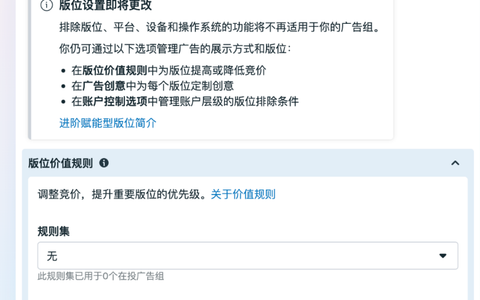
The same ad displayed on Facebook News, Instagram Reels or Audience Network may have different reach scenarios, user attention and conversion quality. In the past, traffickers often manually selected placements in ad groups and excluded inappropriate positions based on goals and data. Recently, some advertisers have seen prompts such as “Features that exclude placements, platforms, devices, and operating systems will no longer apply to your ad group” when editing ad groups, and they are worried that the original control method will change.
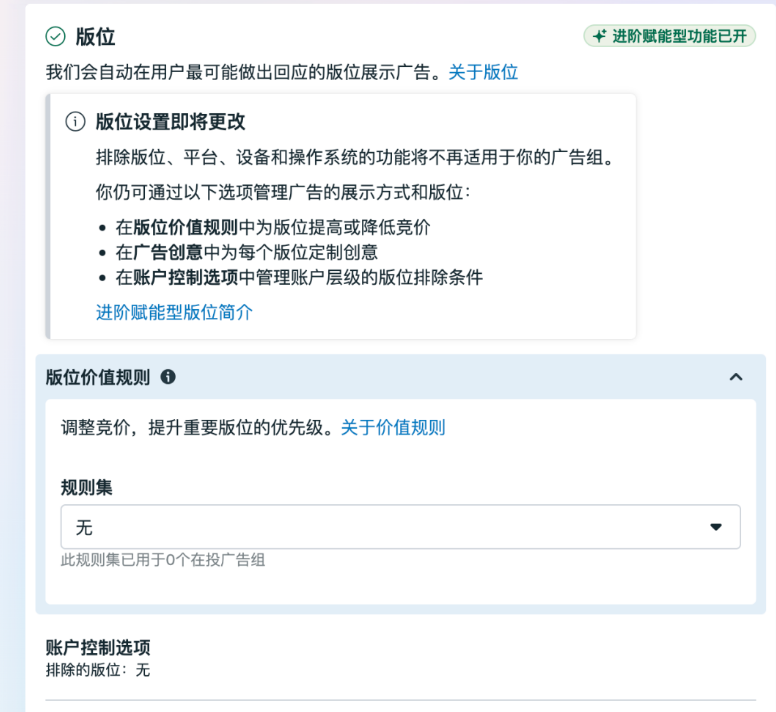
Let’s make the most important point clear first: if a prompt appears in a single account, it can only prove that the account or such settings are changing. It cannot be directly inferred that the functions of all advertising accounts have been offline. When prompted, confirm the campaign goals, accounts, and specific ad groups it targets before deciding whether you need to adjust it.
Pain point: With changes in placement control, what is the delivery team most worried about?
What everyone is really worried about is usually not that the button has changed its position, but that the advertising budget may flow to inappropriate traffic, the brand display environment is out of control, or the experience accumulated based on the original placement suddenly becomes invalid. If account-level controls are used as a substitute for ad group-level exclusions, it may also affect other series in the same account.
The placement performance cannot be judged based on feelings alone. Low-cost clicks may not necessarily lead to effective inquiries or orders; high short-term costs may also be related to sample size, conversion delays, material adaptation, or attribution settings. Excluding placements by only looking at the data of a certain day makes it easy to mistake normal fluctuations for long-term problems.
Current situation: The value rule can adjust the price, but it does not mean that the position is closed hard.
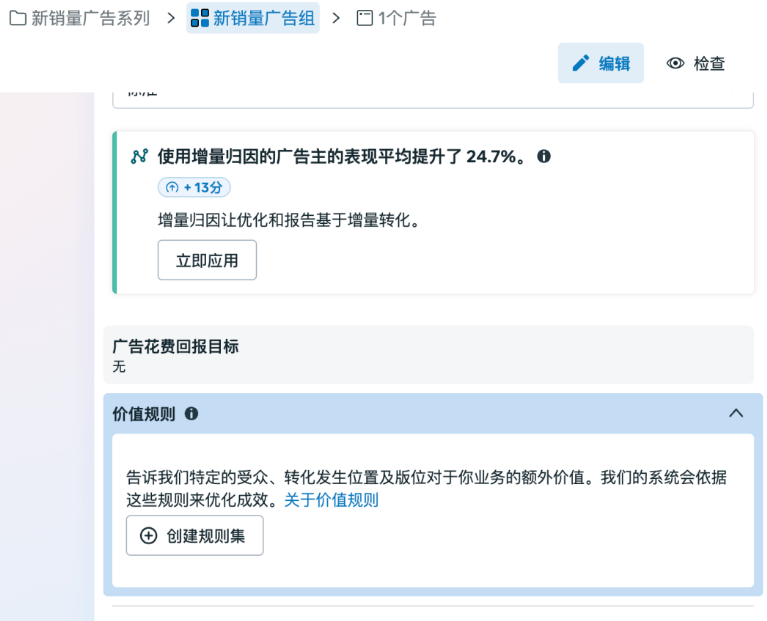
Meta’s value rules are used to express the relative value of a specific audience, placement, or conversion to the business, and adjust bids accordingly. It is a tool to “raise or lower bids” and should not be said to be the same as outright exclusion. The available conditions, interface entrances and options of the rules may change with account and product updates. You can check them before setting them.Meta Business Help Center: Value Rules.
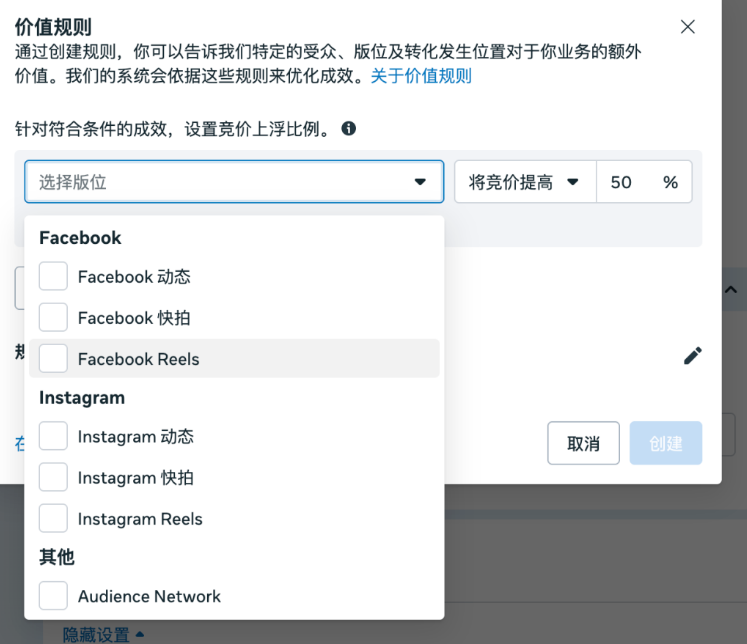
If the account still displays manual placement options, you can continue to use the settings provided in the interface; if a series no longer provides the original ad group-level exclusions, you can first check whether the account-level placement controls and value rules are applicable to your scenario. The account-level control scope is wider and may affect multiple series; the value rule is a price adjustment rather than an absolute shield. Don’t just rely on old screenshots and assume that all accounts have exactly the same entry points, availability, and available placements.
Additionally, the original tip did not give a uniform switch date that would apply to all accounts. This article explains separately “interface prompts seen by some accounts” and “functions explained in official help materials”; if the applicable scope or timetable of Meta is subsequently released, its update should prevail.
Solution: Verify the account first, then use data to select the control method
1. First confirm whether the change really affects this advertisement
Open a specific ad group and record the advertising goals, currently available placements, prompts that appear, and account name. Don’t just look at one series and infer that the entire account has been switched, and don’t immediately make batch changes to ads that are running steadily just because you see a prompt.
2. Review placement performance with full conversion metrics
View cost, effective conversion, conversion cost, lead quality or subsequent transactions by placement, and consider conversion delay and sufficient observation period. If there are insufficient samples, mark the observations first and do not rush to exclude them; if the performance continues to deviate from the target, then evaluate whether the rules are supported by data.
3. Understand the boundaries of each type of control
- Ad group level manual placement: If the option is still available on your account, it can be used for a single ad group; check reach before saving.
- Placement value rules: Raise or lower bids based on verified data; lowering bids does not guarantee that the placement will not receive impressions at all.
- Account-level placement control: It may affect multiple series of the same advertising account. Before activating, take stock of other placements and responsible persons in the shared account.
- Creative adaptation: Prepare appropriate proportions and expressions for scenes such as dynamics, snapshots, or reels to reduce the problem of inconsistency when the materials are displayed in different locations.
4. Test on a small scale and keep adjustment records
Change only one major factor at a time and record the adjustment date, coverage series, expected effects and observation indicators. If you switch to account-level control, first confirm that it will not accidentally damage other businesses; if you enable value rules, first use a small-scale verification, and regularly review display, conversion and cost. When results do not improve, press Record to restore settings rather than continuing to overlay rules.
Brief conclusion for placement staff
Changes in placement prompts are worthy of attention, but there is no need to immediately reconstruct your account just because of a prompt. First check whether your own account is affected, and then use the complete conversion data to judge the quality of the placement; at the same time, remember that value rules are responsible for adjusting prices, and account-level controls may have a wider impact, and they cannot be used as a one-click alternative without evaluation. When it comes to account settings, checking each item and retaining manual review can make the troubleshooting more stable and avoid affecting the normal operation of advertisements.
Virtual Card
Original article by Virtual Card Reviews & Cross-Border Payment Guides. If republishing, credit the source: https://visaspay.com/en/what-should-i-do-if-the-facebook-ad-placement-prompt-has-changed-value-rule/