Virtual Card
Update instructions (September 28, 2026):“More than 30 BMs had problems at the same time” was the description of the case reported by the publisher at the time. It does not mean that Meta has confirmed that a platform-wide ban has occurred. This article separates rumors, verifiable information and troubleshooting methods; when encountering account restrictions, please refer to the reasons displayed in your background and Meta’s official notification.
If several advertising accounts are restricted, stop delivering or see spending fall at roughly the same time, the hardest part is often deciding which to address first and whether one change might affect other assets. Before replacing accounts or payment methods at scale, identify what happened to each account so you can limit the impact.
Background: Why “multiple BM simultaneous anomalies” causes concern
In late August 2026, there was a concentrated discussion in the advertising circle about abnormalities in BM (Business Manager, now known as Meta Business Portfolio) and advertising accounts. Some advertisers claimed that multiple assets under their management experienced restrictions, ads stopped serving, or consumption slowed down at similar times. Others mentioned that dozens of BMs were involved.
For teams that rely on Facebook / Instagram to acquire customers, multiple assets change together, which will affect daily delivery, customer delivery, and cash flow arrangements. The “more than 30” in the title is precisely to show this anxiety, but it comes from individual case feedback and cannot be directly regarded as a statistical conclusion published by Meta or a unified event across the platform.
Pain point: Most afraid of treating different problems as the same “account ban”
Ads are suddenly not consumed, single ads are rejected, ad accounts are restricted, and BM cannot manage assets. On the surface, they all look like “delivery problems”, but the actual corresponding status and processing entry may be different. If the team only bases its judgment on consumption curves, it is easy to mistake bidding or review delays for bans; if it only listens to speculation in group chats, it may make a series of unverifiable changes in order to “save customers.”
When multiple assets are abnormal at the same time, troubleshooting will be more complicated: accounts may share administrators, homepages, domain names, pixels or payment information. They are clues that need to be checked item by item, not automatic evidence of “associated risk control.” Just based on the close time, it cannot be concluded that the problem is caused by a certain card, a certain BM or a certain operation.
Current situation: View community feedback, official status and account notifications separately
As of September 28, 2026, the Meta Business product status page currently shows “no known issues” for products such as Ads Manager. This can only explain the situation currently displayed on the status page, and cannot retroactively prove or rule out anomalies in a certain region, account, or time period in late August; I have not found Meta’s unified public confirmation of the specific statement that “more than 30 BMs have problems at the same time.” Therefore, a more reliable statement is: At that time, some contributors reported concentrated anomalies. The scope, cause and whether it belonged to the same incident cannot be determined based on these feedbacks alone.
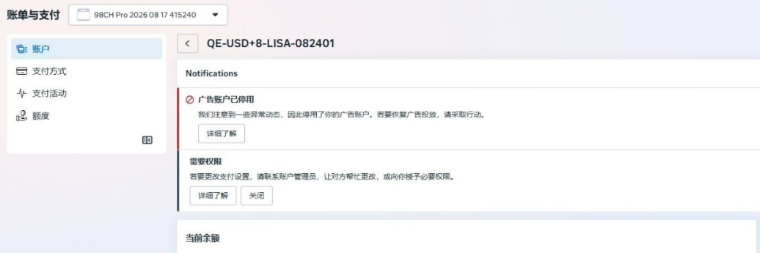
The public status page is used to observe service outages at the product level and cannot replace the restriction notification in your account. Whether the account is restricted, what the restrictions are, and whether you can apply for review should be based on Meta Business Support Home, the account status page and the actual prompts in the backend. There is no fault record on the status page, and it does not mean that there are no problems with a single account.
Solution: Classify types first, keep records, and then process according to the official entrance
Step one: Confirm the affected objects one by one. Record the status of BM, ad account, homepage and advertisement respectively, and do not combine “cannot enter”, “ad is disapproved”, “account restriction” and “ad is qualified but not consumed” into one question. Save background prompts, notification emails, error codes and first occurrence time.
Step 2: Check the corresponding location according to the symptoms. If the ad is eligible for delivery but consumption is abnormal, first check the budget, schedule, audience, bidding, review status and delivery settings; when clear restrictions appear, check the account status or the specific reasons and executable actions given in Business Support Home; if it prompts payment failure, then check the bill, payment method status, available limit and card issuer’s chargeback information. Payment issues and policy restrictions are not the same thing. Changing cards cannot lift policy restrictions.
Step 3: Sort out the common points, but don’t take the clues as a conclusion. List administrator permission changes, asset sharing relationships, domain name/home page binding, recent important settings adjustments and payment failure records by time. Only verify the real business information that you have permission to manage, and avoid removing assets in batches, repeatedly changing bonds, creating alternative accounts, or repeatedly submitting conflicting appeals when the reasons are unknown; such operations may not solve the original problem, and will also make the records more difficult to judge.
Step 4: Follow the official prompts to appeal or contact support. If the dashboard offers a review request, provide a concise, truthful and verifiable explanation with relevant screenshots or business records. Do not conceal facts or repeatedly submit conflicting accounts. If there is no review option, first complete the requested security checks, identity verification or business information, then check official support for the next step.
Step 5: Verify in batches after recovery. After confirming that the reason for the restriction has been dealt with and the account status has been restored, first observe a small amount of advertising and normal budget, and then gradually resume the plan; at the same time, keep the operation log and payment record to facilitate quick positioning next time. Don’t regard any single payment instrument or “preparing multiple accounts” as a risk control guarantee.
Priority viewing:Meta Business Product Status Page、Meta Business Support Home. The former looks at service status, while the latter and account background notifications are used to check specific prompts related to your business assets. The entrance and available operations may vary depending on the account status, please refer to the page after logging in.
If you encounter multiple accounts fluctuating at the same time, first stabilize the rhythm and retain the certificates item by item. This will help you determine the problem better than migrating in batches immediately. Separate “what you heard happened” and “what your account actually shows”, and you will have more basis for whether you are waiting for service to be restored, correcting payment information, or applying for review.
Virtual Card
Original article by Virtual Card Reviews & Cross-Border Payment Guides. If republishing, credit the source: https://visaspay.com/en/facebooks-large-scale-risk-control-more-than-30-bms-have-problems-at-the-sa/