Virtual Card
After waiting for a long time, Codex has finally entered the ChatGPT mobile app.
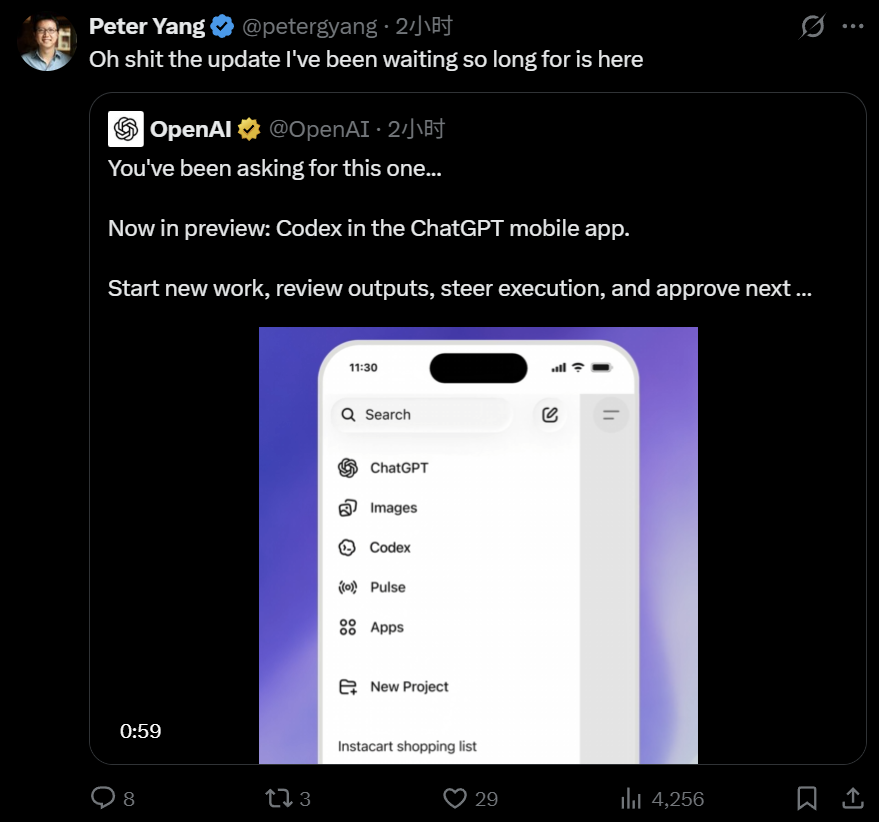
This Friday OpenAI announced that Codex has opened preview in ChatGPT’s iOS and Android applications and is open to all users. Free users can also use it.

This means that developers don’t have to stay in front of the computer all the time. Whether you are commuting, between meetings, or waiting in line to buy coffee, you can take out your phone to check the progress of the task, approve operations, supplement requirements, and even open a new task directly for Codex.
For those who often let AI run long-term tasks, the significance of this update is not just “being able to take a look on the phone”, but also making collaboration truly continuous online. virtual card
Mobile phones no longer just look at results, but can take over work
OpenAI says more than 4 million people are currently using Codex every week. As AI agents begin to handle longer, more complex tasks, users will also need a more flexible way to engage.
Now, Codex can continue to work on your laptop, Mac mini, Dev Box or remote development environment; and you can check what it is doing at any time through the ChatGPT mobile app.
For example, you can see on your mobile phone which files Codex is checking, what problems it has found, how to modify it, and whether the test has passed. When you encounter something that requires you to make a decision, you can reply or approve it directly without having to wait to go back to the computer to deal with it.
More importantly, this is not just about remote control of a certain task.
You can view all ongoing threads, read terminal output and code differences, approve commands, change models, or create new projects through your mobile phone. Files, credentials, permissions, and local configurations remain on the device running Codex; task progress, screenshots, terminal logs, test results, and approval information are synchronized on the mobile phone.
To put it simply, the computer is responsible for doing the work, and the mobile phone is responsible for controlling the overall situation. virtual card
In these scenes, you finally don’t have to look at the computer all the time.
Fix a bug while waiting in line to buy coffee
Codex can inspect the code, try to reproduce the problem, run tests and start fixing it in your development environment. If it requires more information, or your authorization to perform an action, you can reply directly from your phone.
Throughout the process, you can see screenshots, terminal output, and test results. When you get back to your computer, you may just want to make sure the final changes are as expected.
Making technical decisions on the commute
Before leaving the house in the morning, you ask Codex to handle a long refactoring task. On the way, it finds that there are two possible options, and you need to decide what to do next.
In the past, this kind of situation could only be dealt with after entering the office; now you can quickly read the pros and cons and choose a plan on your mobile phone. By the time you get to the company, the task has already progressed in the direction you selected.
Quickly complete information before customer meetings
Support questions tend to be scattered across Slack, email, docs, and the browser, and things can change at any time.
If you have an immediate call with a customer, you can ask Codex to summarize the latest progress, highlight unresolved issues, and organize it into a brief communication outline. If there is new information in the middle, you can also let it continue to update to avoid entering the meeting with expired information.
When inspiration strikes, get it started immediately
A product idea or technical idea often pops up while having lunch, taking a walk, or watching content.
In the past, you might just write it down in a memo and wait until you get back to your workstation; now you can create a new Codex thread directly on your phone, or add ideas to ongoing tasks. By the time you return to the computer, things will already have a preliminary result.
Even if you are not in front of the computer, you can still hold the task firmly in your hands
Behind this mobile terminal capability is Codex’s secure relay mechanism.
To simply understand, Codex still runs on your trusted computer or remote environment and does not expose the device directly to the public Internet. The mobile terminal accesses task status through an authorized ChatGPT account, so context synchronization can be maintained between different devices.
This also means that users do not have to interrupt long tasks just because they leave the computer. virtual card
You can initiate a task on the desktop, use your mobile phone to view and approve it when you go out, and let Codex continue to execute; return to the computer and take over the follow-up work.
Remote SSH is also here
In addition to the mobile version, OpenAI also officially launched remote SSH support.
Many teams inherently develop in hosted remote environments, where dependencies, credentials, security policies, and computing resources are often already configured. Codex can now connect directly to these environments.
The desktop application will automatically identify the host in the SSH configuration, allowing you to create projects and run tasks on the remote machine just like operating a local computer.
After the connection is completed, these environments can also be accessed on authorized ChatGPT devices through this secure relay mechanism. In other words, you can start the task on the desktop and continue to follow it on your mobile phone, so that long-running work is not interrupted and is no longer restricted by a single device.
What other updates will follow?
OpenAI also revealed that it will continue to enhance Codex’s capabilities in team automation, customization and management.
These include:
- Programmatic Access Tokens: Credentials with scopes can be created from the ChatGPT workspace settings for use in CI pipelines, release processes, and internal automation.
- Hooks are officially available: Can be used to scan prompt words for sensitive information, run validators, record conversations, create memories, and customize Codex behavior for specific repositories or directories.
After Codex entered the mobile app, the way of using AI programming tools is also slowly changing.
In the past, AI was more like a conversation that could only be started while sitting in front of the computer; now, it is more like a collaborative partner that can continuously advance the task. You don’t have to keep an eye on it, but you can take over at any time when it’s critical.
Virtual Card
Original article by Virtual Card Reviews & Cross-Border Payment Guides. If republishing, credit the source: https://visaspay.com/en/codex-logs-into-chatgpt-mobile-app-all-users-can-use-it-and-can-approve-ass/