Virtual Card
Reading instructions: This article is the author’s personal test record of automated advertising delivery, and is not an official operating guide for Meta or OpenAI. Advertising interface permissions, product functions, and background processes will be adjusted; the problems and time-consuming problems encountered in this article belong to specific accounts and the environment at that time, and cannot be directly inferred as a general situation for all users. Please retain manual review when it comes to account writes, enabling ads, or budget changes.
Background: Why would you want AI to assist with Facebook ads?
Advertising accounts require repeated processing of series and ad group structures, audiences, materials, naming and data review. There are many repetitive steps, the configuration is easy to miss, and advertisers are often occupied with daily operations. Therefore, it is indeed attractive to let AI help sort out investment plans, check configurations, and reduce mechanical operations; but “being able to generate plans” does not mean “suitable for operating real accounts without review.”
My team and I have tried to use different AI tools to connect the advertising process. In a test, the automatic creation of series and ad groups, and the adoption of account naming habits performed well; this shows that automation has potential, but a single success does not prove that it can be reproducibly stably under different account, permissions and material conditions.
Pain points: Audience, post reuse and execution stability may all be stuck.
In my test environment at that time, I mainly encountered three types of problems. They may come from interface permissions, account configuration, tool adaptation or specific request parameters. They should be located one by one when troubleshooting, rather than simply attributed to a certain connection solution.
1. Audience reading or selection failed
Some requests return prompts such as “The audience is empty” or “Insufficient permissions”. In this case, check app permissions, ad account authorization, audience status, and request fields first; don’t let automation switch to a different audience and go live if you’re not sure.
2. Existing post IDs may not be reused smoothly.
Teams may want to reuse posts with existing engagement or conversion records for new ad groups, but reuse depends on creative type, object ID, account permissions, and interface requirements. First confirm the objects and permissions in read-only mode, and then verify in the test environment; do not regard “reuse successfully” as a guarantee that every account is applicable.
3. Call time, cost and error handling
In my test, some calls responded slowly, and some requests reported errors. Occasionally, manual remediation can be performed during analysis; if it is used to continuously create or adjust advertisements, retry rules, error prompts, idempotent processing, and manual takeover must be designed in advance to prevent failed requests from being executed repeatedly.
Current situation: The permission boundaries of interfaces and AI tools are constantly changing
Meta updated the access level of the Ads Management API in 2026, renamed the original Ads Management Standard Access to Marketing API Access Tier, and adjusted the relevant access level descriptions. The actual available capabilities are still subject to the application, business, account permissions and Meta review results; “upgrading a personal account to a developer account, applying for a long-term Token and then placing it directly” is not a universal process that applies to everyone. Please review before applying Meta’s official description of Marketing API access levels.
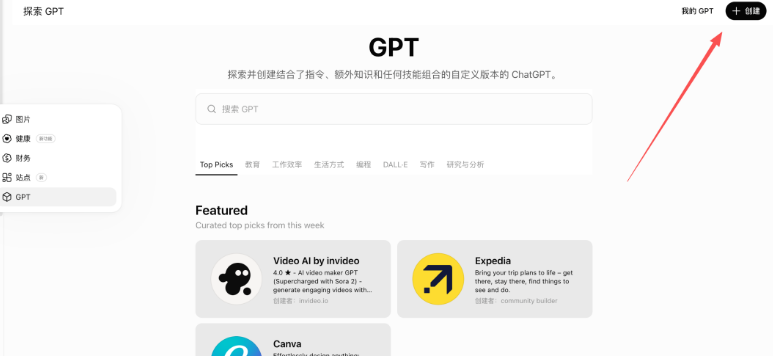
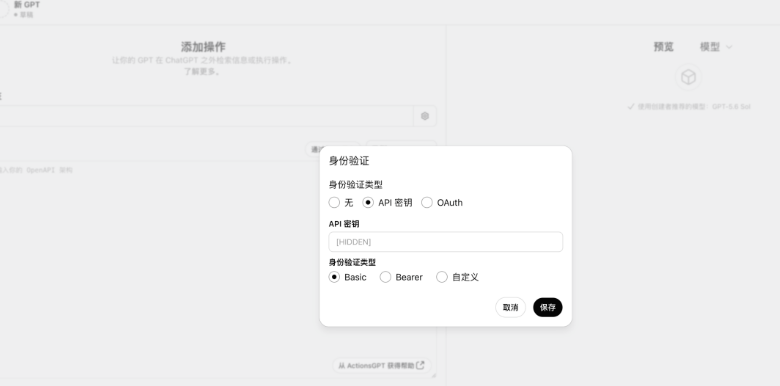
For custom GPT Actions, availability depends on your plan, workspace settings, authentication method and API schema configuration. Connecting an action does not itself grant access to an advertising account; verify these permissions separately. Start by reading OpenAI instructions for configuring GPT Actions.
More important is key security. Do not include Meta Tokens, App Secrets, or other keys in public articles, front-end code, shared prompts, or untrusted custom app configurations. Keys should be stored securely by a controlled server with the minimum permissions required to complete the task, set expiration dates, log calls, and promptly revoke compromised credentials. OpenAI also recommends avoiding exposing API keys in client environments, see API Key Security Recommendations.
Solution: Let AI make suggestions first, then gradually open up controlled operations
Compared to connecting a “universal pitcher” directly to a real account, I recommend splitting the work into clear stages: first do read-only analysis and plan drafting, and then have people review it; only after confirming security, permissions and results, can pilot writing be done within a restricted range. Testing and scaling can be handled by different processes, but neither should bypass final approval.
Step 1: Read-only diagnosis, first understand the data and rules clearly
First, let AI summarize the account structure, historical performance and items to be checked, output suggestions and basis, and do not create, edit, or enable ads. Let the placement staff check the attribution window, conversion delay, pixel or event postback, budget caliber and account permissions to avoid making automatic judgments when the data is incomplete.
Step 2: The testing process is only for screening, without unauthorized shutdown or budget increase.
Test Agent can organize material performance according to the rules confirmed by the team, mark ads that need review, and explain the basis for judgment. Don’t write a single threshold value such as “run for 3 days” or “spending reaches a fixed multiple of the average CPI” as a universal answer: the conversion cycle, gross profit, attribution and sample size of different businesses vary greatly. The threshold should be determined by both account history and affordable cost. AI is only responsible for prompts and does not automatically stop investment.
Step 3: Give phased suggestions for the expansion process
Expansion Agent can compare budget, conversion cost, consumption speed and recycling performance, make suggestions for minor adjustments, and explain the risks and data basis. The budget gradients in the original article are only historical examples for the author’s specific account and are not recommended amounts, nor are they a guarantee that other accounts will achieve the same results. Any real budget changes should be capped and confirmed by the responsible person.
Step 4: Small-scale pilot, retaining manual approval and rollback
- Verify reads, field mappings and error handling on a test account or low-risk scope first;
- Display the objects, amounts, audiences and materials to be created or modified before each execution, and require explicit approval from the person in charge;
- Set hard limits for daily budget, total budget, operable accounts and executable actions, and record requests, approvers and results;
- Prepare methods for pausing automation, revoking permissions and restoring configurations; stop writing when an exception occurs, and switch to manual troubleshooting.
Conclusion: The value of automation is to reduce repetitive work, not to replace delivery judgment.
AI Agent can help the team organize information, generate plans for review, and check duplicate configurations, but advertising goals, budget risks, material compliance, and business results still need to be checked by the person in charge. Reading only first, then piloting, and manually approving every write is usually safer than pursuing full automation at the beginning. Before starting configuration, please also recheck the latest official documents and account permissions of Meta and OpenAI.
Virtual Card
Original article by Virtual Card Reviews & Cross-Border Payment Guides. If republishing, credit the source: https://visaspay.com/en/i-used-gpt-to-build-two-ai-agents-to-assist-in-placing-facebook-ads-strateg/